If you're going to reinstall your EVO device, you would wonder which packages and drivers you need to, for your device, to work properly in the distribution you chose. In this tutorial we will show you which packages and fixes you need for your device.
Pre-installation
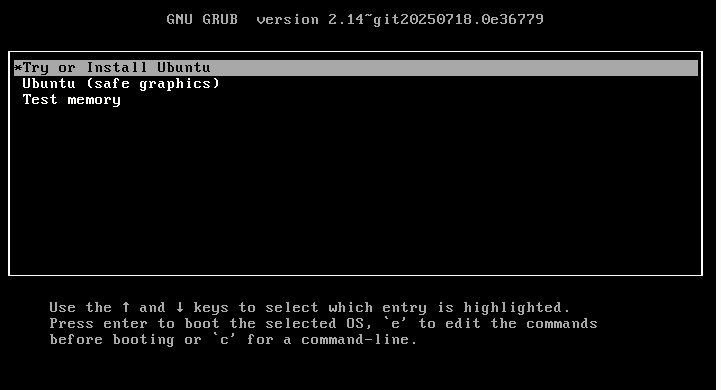
Before installing the OS in your EVO, you will need to add a kernel parameters to avoid graphical crashes while installing::
For the majority of the distributions, its Live CD supports changing kernel parameters, you can access this menu while pressing TAB or space when booting up.
Depending on your distribution, the entry menu that you need to edit will change, but it will be "Install" or "Start Live CD" related. To edit the entry menu you need to press the E key.
You will need to add the parameter amdgpu.dcdebugmask=0x610 to the kernel parameters, usually after quiet splash
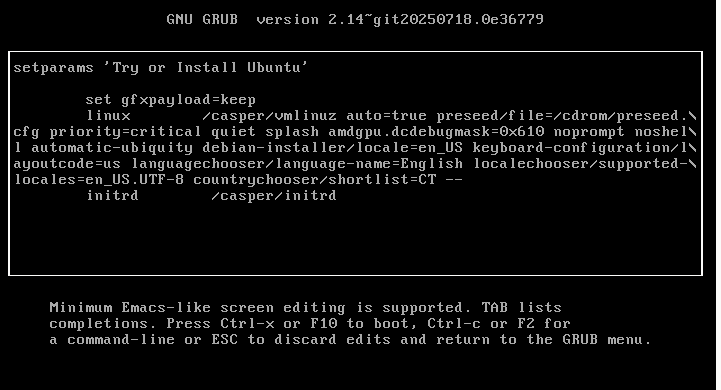
This parameter will let you install the distribution without any graphical issues.
Post-installation
After installing the distribution in your EVO, you will need our repositories to install the programs needed for the device, in this tutorial we will show you how to install them: Add the SLIMBOOK repositories on Linux
The packages and drivers needed for your EVO device are: slimbook-meta-common y slimbook-meta-evo.
If your distribution uses the GNOME or Plasma desktop environment, you will need its corresponding packages for these: slimbook-meta-gnome y slimbook-meta-plasma
Windows post-installation
If in your case you use Windows, and reinstall your device, you will need to install our drivers, the AMD Adrenaline driver needs to be the one we provide, as the one that provides publicly AMD has instability issues. More information here: Freezes and instability on Windows
